


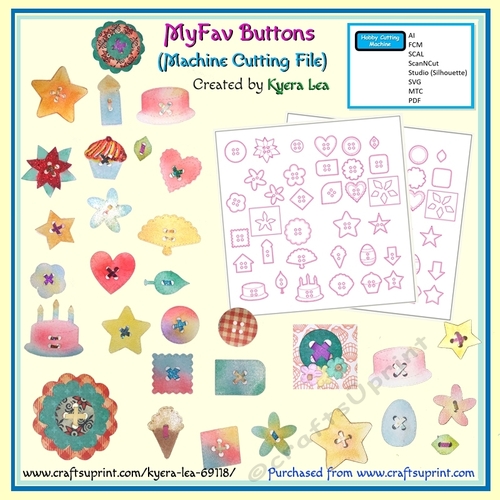
Use the button shapes to add dimension to your scrapbook, cardmaking and other craft projects. These machine cut buttons can be sized and cut out of patterned paper or colored / inked.
- Coordinate them with frames or other elements on your page.
- Glue them anywhere and on anything.
- Size and stack them.
- Thread the buttons with paper strips.
- Place them around an image to create a button frame.
- Glue them to a ribbon.
- Use the buttons to finish a pocket or envelope.
- Add dimension by using a fine water spray and ball tool.
- Use the buttons to add color to a page.
- Combine the buttons with flowers, sentiments, ribbon, etc.
- Use the button (sized larger) to frame a picture.
- Add a button to the top of a bookmark.
- Add packing tape to both sides and hole punch. The buttons can be used as earrings or pins.
- Kids: Great for kids, let them color or stack buttons. The cutout shape allows you to add your child’s artwork to your project. . . a perfect keepsake.
Bonus: also included are the files without the button holes (ScanNCut, SVG, PDF, AI, Silhouette). In the Make the Cut files, omit the “hole” layer. There is also two stencils for inking / layering the poinsettia (optional). Optional: Embellish buttons with glitter glue, gem stones, stickers, decoupage or ribbons. Cut the buttons on double-sided paper for stacking. For other ideas, see sample in gallery. Files available: ScanNCut FCM; SVG; SCAL; AI; PDF, Silhouette Tip: If you resize the buttons and the holes don’t line up, thread the top layer and glue it as the top layer.
MyFav Buttons (Machine Cut)

Photographs from the Community (1)
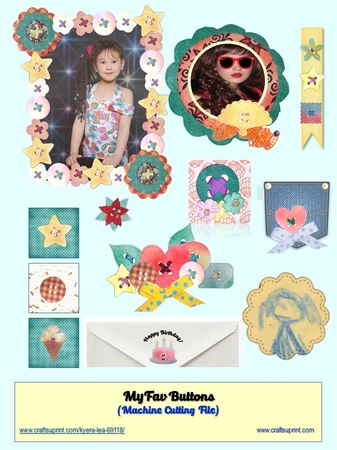
Examples for how to use the buttons. . - Coordinate them with frames or other elements on your page.- Thread the buttons with paper strips. - Place them around an image to create a button frame. - Glue them to a ribbon. - Use the buttons to finish a pocket or envelope. - Use the buttons to add color to a page. - Combine the buttons with flowers, sentiments, ribbon, etc. - Use the button (sized larger) to frame a picture.

