


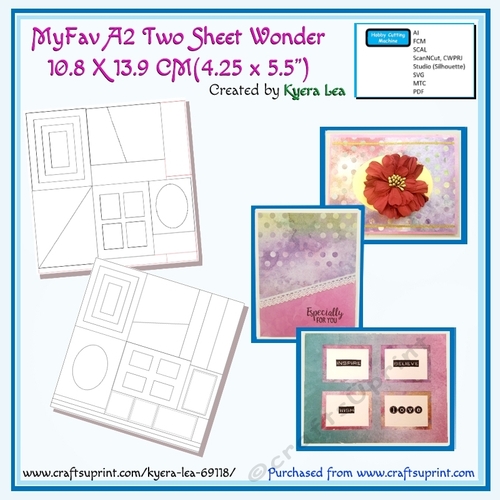
I love One Sheet Wonders, but I sometimes make mistakes when measuring and cutting. My Cutting machines (ScanNCut and Silhouette) ensure the cuts are perfect, no mistakes are made and there is little waste. I also get exact oval frames, and an inner mat. Ovals are hard to cut by hand.
This file contains “Two Sheet Wonders” patterns. The first page will coordinate with the second page, adding a mat, if desired. Use the smaller straight pieces of paper as accents.
Using each cutout separately, the two files can create 32 cards. Mix and match / Combine as desired. These cutouts can also be used in scrapbooking (frame pictures, use as tags, accent pictures). The 4 rectangular cutouts can be used to create a pyramid card by adding a smaller under layer.
Sample cards are included in the directions.
Sometimes, I just need a pretty background for my “Heartfelt” 3D flowers, and these “wonders” are just the perfect accent.
Optional: Embellish the card with glitter glue, gem stones, stickers, decoupage, ink, stamps, tags, paper or ribbons. To bring out the stitching, use distress inks. Add shading with distress inks or outline the edge with markers.
The Silhouette is more complicated due to the margin required for cutting. There are two different files, one scaled down to fit in the margins and one to actual size. Use which ever file you prefer. Cut the margins down and add to cards as in the samples.
See the tutorial file for other examples and layouts using the cut parts.
This file contains only the cutting files for the two white pages on the main picture.
===========================================================
